Having an organized things to do list is a great tool to use in your quest to get organized! Whether you keep yours on paper, incorporate it into your family calendar, or even use an app- there are 5 steps you should follow if you are trying to figure out, “As a busy Mom, how do I manage my to do list?”
Things to do lists are both the best thing ever and the worst thing ever!
They keep us organized and on top of all of the millions of things that we want to accomplish, but at the same time, they can make us feel as if we have so much work ahead of us- that we’ll never get it all done.
And let’s be honest- WE WILL NEVER GET IT ALL DONE! That’s right- most of us will leave this earth someday with stuff still on our things to do list! (Sigh… shake it off…. move on…)
So once we accept that our to do lists are always a work in progress- we can focus on managing our things to do list so that we can feel organized and intentional about how we spend our time.
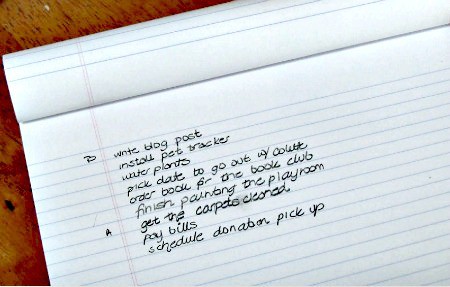
1. Keeping a Things To Do List Allows You to “Write It Down and Forget About It”
At least until it needs to be done! But honestly, since most of us left a good portion of our brain cells behind when we entered this stage of life called “Mommyhood”, the practice of writing things down has become very important.
We need a system that allows us to get it all down somewhere- on paper, on our calendar, in an app (but ideally on something better than the back of a napkin). So the first step in managing your to-do list is to get it all out of your head and onto a list.
2. Create One Master To Do List
Keeping multiple lists in several notebooks or on post-it notes stuck to the walls and on your computer leaves you feeling scattered.
I recommend making one long master to-do list- one that covers everything you someday hope to accomplish.
I suggest that you keep your list categorized by topic- to-dos for around the home, to-dos for your business, etc.
3. Prioritize the Items on Your Things to Do List
When you are staring down a list of 100+ things you’d like to accomplish, there should be an easy way to zero-in on what you need to work on today. A good things to do list should allow you to assign priorities to items.
I like to go through each item on my list and assign it a letter A thru C. A's are things that are super-important and that I truly need to get done soon. B's are things I would like to do, but my world won't fall apart if I don't get to them. And C's are “nice to do's” but generally remain on my to-do list for a long time.
Of course you have to be able to easily re-prioritize things when you get that call from the school saying you need to come and pick up your child because he has a fever.
4. Assign 2-3 items from your master list to your daily or weekly schedule- but keep it realistic!
Pick one to three things each day or even each week that you can realistically accomplish. And assess how long it will take you to get it done.
Don’t assign “Clean out the basement”, “Put last year's photos into a scrapbook” and “Dust the baseboards throughout the house” onto this week’s list simply because it consisted of just three things.
It is the surest way to get none of this done since you’ve set yourself up for failure right from the get-go.
5. When assigning items to your weekly to-do list, break them down into manageable bites!
Re-painting our kitchen has been on my to-do list for a long time now. But to put that on this week's to-do list only sets me up for failure.
Instead, I can break it down into manageable steps- select the paint colors, then buy the paint, then tape the trim, then paint one wall, etc. Over time (days or weeks) these bite-sized steps should lead me to achieve my larger goal.
Paper or App?

This is really a matter of personal preference- and to tell you the truth- at different times I find myself gravitating towards different systems. Right now I have my master to-do list on paper, and I am using this weekly to do list planner This is an affiliate link: MomOf6 earns a commission if you purchase, at no additional cost to you. to manage my daily to-do list. (I absolutely love this weekly planner that is sold as a tear-off pad. I love using the bottom section to set my intentions for the week, and then having a column for each day to plan what I want to accomplish to support those weekly goals).
 Are you a busy Mom who could use some support?
It helps if you have “the right tools for the job”! Busy Moms need a great calendar or planning system (you can find my favs here This is an affiliate link: MomOf6 earns a commission if you purchase, at no additional cost to you. ) and an efficient command center This is an affiliate link: MomOf6 earns a commission if you purchase, at no additional cost to you. to keep things running smoothly for the whole family! You can find more great resources for busy Moms over on my Amazon influencer page This is an affiliate link: MomOf6 earns a commission if you purchase, at no additional cost to you. !
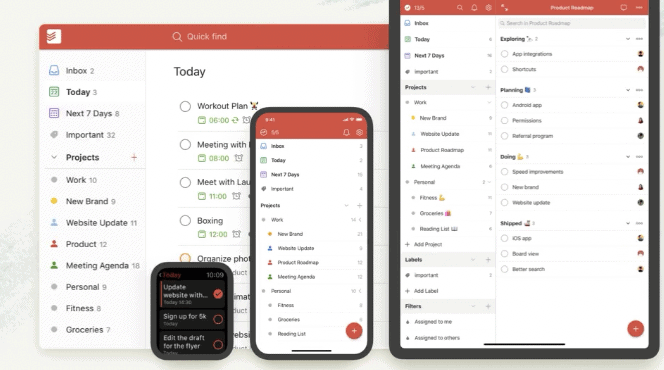
I have also used the Todoist App (from the App Store) on my laptop which syncs nicely to my Apple calendar (as reminders), and also to my tablet and smartphone so that I can see my to-do list everywhere I go.
This is a good place to keep a master to-do list as well as set up recurring weekly reminders- for things such as “water the plants” and “give the dog his monthly meds”- things that I honestly forget to do unless it is on my calendar!
To Do Lists in Action…
If you would like to see how I organize my to-do list- check out this video:
Looking for the best family calendars, planners, to-do lists, and goal setting tools?
- Best Family Calendars – whether you prefer electronic, paper, or wall calendar- these are the best ones of the year!
- Best Planners for Moms – a family calendar can help you organize your schedule and your time- but a planner can help to make sure that you are giving your life purpose!
- 15 Perfect Paper to Do Lists for Busy Moms- pretty paper lists to guide you as you get it all done!
Here are some great ideas on how to organize your home!
- 15 Fantastic Command Centers to Help Busy Moms Stay Organized
- 10 Great Menu Board Ideas
- 20 Organized Kids Bedroom Ideas
- 10 Organized Laundry Room Ideas
Are you ready to get your life organized? Register for Busy Moms Boot Camp!
It's a free series of 10 weekly emails that can help you put some organization back in your life and help you to create room for all of those things that you'd like to be doing- whether that's making time to celebrate the little things with your family or carving out some space for yourself. Busy Moms Boot Camp can help you to move from chaos to organized! Simply sign up below to get started!
So please weigh in…. how do you organize your to-do list? On paper, in your calendar, or in an app? And does having an organized to do list help you to get more done?

LilBitsMum says
I love the Wunderlist app. It has a downloadable version for your laptop, syncs to ipad, phone, and there’s a web version that’s accessible. It is basic but flexible and allows you to customize. It’s really helped me consolidate and organize all my tasks, and assign dates which help me prioritize. Great ideas on this blog!
Margaret Cooling says
Just discovered you YouTube videos & your web site!!! Love the tips, & although I don’t have 6 kids, my girls are VERY busy, which means I’m busy too. My oldest daughter is leaving for college in a year & I’m desperate to save money ANYWhere I can. So I’ve started comparison shopping & couponing. I love your spread sheet on comparing store prices! I’m excited to fill it in, so I can shop smart. So did it take you a long time to fill it in or was you able to get starting prices on line? Any advise would be wonderful! Thank you for your time.
Margaret Cooling
sarah says
i have a daily/weekly/monthly list in our kitchen that i can cross off. For that bigger list…i will go your way=) Perfect!
Margaret Cooling says
Thanks