As Moms running our households, many of us find ourselves in the position of managing the family budget and handling the bill paying. But doing this in an organized manner can be challenging, which is why I am sharing this 2nd post in a 3-part series on how to track your money. In the first post, I offered tips on how to set up an organized bill paying system in a manner that is simple and cuts down on the amount of paperwork you receive, process, and recycle. In this post, we are going to talk about how to approach the monthly bill paying process.

Schedule your monthly bill paying process twice-monthly in your calendar
Life is busy and before you know it, the calendar has turned over to yet another month. So save yourself the headache of trying to remember to tackle this on time- and have it pop up as a reminder on your phone or on Alexa.
Use your list of payees
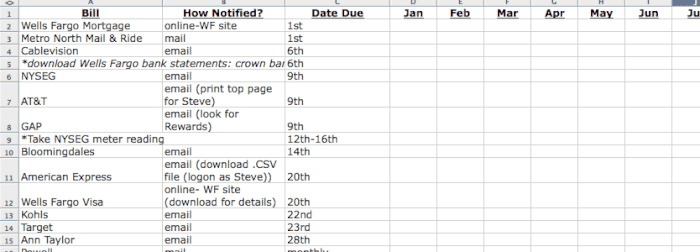
In the first post in this suggested creating a list of all of the bills that you need to pay, with a note on how you will receive each bill, and the bill's due date. Here is an example of what my list looks like:
Locate the unpaid bills
Using your list, you'll need to locate each bill that is due. If you are receiving your e-bills via e-mail (as I am), I suggest that you add a folder in your email account that you label “Unpaid Bills”. When you receive a new bill via email, drag and drop it into that folder. This will clean up your inbox and will give you just one destination to go to when you need to find all of your unpaid e-bills.
For the bills that you are still receiving via US Mail, I suggest keeping a folder in your kitchen command center to store all of your unpaid paper bills.
Pay the bills
Now log in to your online banking bill paying site- and pay those bills! Or if you are taking the low-tech route- write the checks, stamp the envelopes, and put them in the mailbox.
Add the transactions to your check register
In the first post, I mentioned the free online system called Mint that can be used to track where your money goes. However, this system is only as good as the information that is posted to it. So if you are using Mint, and you execute an online bill pay from your bank to pay your utility bill, but set the payment date to be next week, Mint is not going to see that transaction until the payment is made.
The same goes for any paper checks that you write, Mint is not going to “see” them until they are cashed by the receiver and presented to your bank. For that reason, I recommend that you still plan to keep some kind of a check register to keep track of every transaction that you have executed against your bank account, and that you can reconcile a bank statement against.
I have built a simple spreadsheet in Excel where I can quickly enter all of my information. I can also indicate if a transaction has appeared on a bank statement, and when I do, the amount no longer appears in my “not cleared” column. This makes it extremely simple to check off transactions from my statement and then balance my account.
Of course, you could still use the old-fashioned paper check register that comes in the box along with the paper checks that your bank sends to you.
Clear up the bill clutter
When you are finished paying the bills, delete any e-bills (there is really no need to save them, if you ever wanted to see the information again, you should be able to find it online from the payee's website).
If it is a paper bill, I recommend using a file to hold just the current month's paid bills, and each month after you pay the new bill- shred the old one.
Monthly Bill Paying Process: Review your credit card transactions for accuracy
Please don't just pay your credit card bills without checking the detailed transactions! There have been many instances when I have located accidental double billings by a store, or a realized refund that I was due that wasn't processed properly. Your best chance of having your credit card company assist you in a dispute is by recognizing the error as soon as possible.
There are several ways to access and review your credit card statements. I love using Mint for this. I have added my credit card accounts to my Mint profile, and I can log in at any time and see the transactions as they are booked to my account.
Mint also assigns a category to each transaction which I can update if desired, and this will help me enormously when I track my monthly spending against my budget (something I'll go over in Part 3 of this series).
You can also access your credit card statements online via your credit card company's site. You can review the transactions right there on the web, or you can download your statements into a .pdf file to print them, or you import them as a .csv file so that you can sort them, add subtotals-whatever you'd like.
Or you can receive your credit card statements in the mail- the low-tech old fashioned way. But for goodness sakes- no matter how you access them- be sure to review them!
Monthly: Download bank statements and reconcile them against your check register
Make sure that your checking account balances each month against the statement prepared by the bank!
The surest way to get yourself into financial trouble is to forget to record something in your check register, and then you then spend that $ again- causing a check to bounce. This leads to bank fees on both ends of the transaction- your bank will likely charge you for the bounced check, and the person you wrote the check to will also likely pass along a returned check fee. AND you'll still owe the payee the original amount!
Double-checking your check register against the bank statement each month will help to ensure that this never happens to you!
Monthly Bill Paying Process: Review savings and investments
I highly recommend using the free online tool Mint to track all of your savings and investment accounts (yes, I know that this is starting to sound like a paid commercial- but I swear that I am just a satisfied customer who is sharing her favorite tips!).
You can securely link up your 401K accounts, your savings accounts, your kids' college savings accounts including any 529 plans, and any other investment accounts that you have.
On the Overview page you will be able to see the sum total of all of your savings accounts, and on the Investments page you will be able to see all of the detailed investments for each account- cash, stocks, bonds, and so on.
And why are we bothering to track all of our investments? Because you and your significant other need to review investment performance on a regular basis so that you can decide if you are still making good choices for your family!
Monthly: Review your actual spending against your budget
This is one of the most important things you can do each month as your family's money manager- track what you are spending vs what you had planned to spend. But that is a whole other big topic- one that we will cover in Part 3 of this How to Track Your Money series.
There are two more posts in this series on How to Track Your Money:



Commercial Locksmith Houston says
Greetings from Florida! I’m bored at work so I decided to browse your website on my iphone during lunch break. I really like the knowledge you provide here and can’t wait to take a look when I get home.
I’m amazed at how fast your blog loaded on my phone .. I’m not
even using WIFI, just 3G .. Anyways, awesome site!